Showing posts with label games. Show all posts

Friday, September 25, 2009

Alphabetical Order

A teacher of mine asked for some resources to help reinforce the concept of alphabetizing to her first grade students. I wanted to pass along what I was able to share with her.

1.) Using the "Sentence Arrange" game in Lesson Activity Toolkit 2.0 in SMART Notebook. This allows the teacher to use any combination of words they would like the students to practice with. Students can check their work, and the page can be reset so the words are scrambled, allowing for continual practice. You can download a sample file here.

2.) Crickweb has a wonderful assortment of resources that work great on a SMART Board, both for literacy and numeracy skills (it is based on the UK standards of education). This particular activity (Alphabetical Order 1) allows for students to alphabetize easy words, progressing through increasing levels of difficulty.

Crickweb  Flash Page.png by lsharbaugh on Aviary

3.) Roy the Zebra also has a nice variety of resources for the SMART Board in the area of literacy, including alphabetical order, double consonants, and capital letters. There are five different levels of alphabetical order games based on the number of letters included.

Reading Games  Alphabetical Order Game 1.png by lsharbaugh on Aviary

Enjoy these new tools for your toolbox and keep asking questions!

Friday, April 17, 2009

Blockbusters

A great (possibly) new review game for you all to try on your interactive whiteboards this week. It is taken from the old TV game show Blockbusters. I've posted a link to a YouTube video so that you can see exactly what I'm talking about.


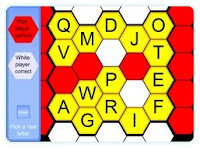
In this game, two teams compete against each other to answer questions. The answers to these questions begin with a certain letter of the alphabet. If a team gets a question right, that team's color gets control of the hexagon. One team is trying to complete a row of hexagons from left to right across the board before the other team completes a column of hexagons from top to bottom. Click here to go directly to the online blockbuster game. (or click the picture to the left to read a little more about it)


You can also read another description of the Blockbuster classroom game by going to the TeqSmart blog. The rules and game format they describe would be the same as you would use with the website game above. There is a video on their blog showing the game in action. TeqSmart offers a downloadable version of the Blockbuster game that allows you to type in and customize the questions. If you are intersted in this, please let me know.


This game would require a little bit of either advance planning or fast on the spot thinking in order to come up with questions that have answers that start with every letter of the alphabet (except Y and Z), but I think this game would work really well for certain chapters of study.


Let me know what you think of this tool! Have fun!

Sunday, March 15, 2009

No Hassle Jeopardy

I just found a resource that has got to be one of my favorites of all-time. http://jeopardylabs.com/ This site allows you to customize your own jeopardy board and game. You put in the questions and the answers, and it handles the rest. You don't have to register; you don't have to save anything to your computer. It gives you a "url" address where you would access the created game. You could then play it as a whole class review activity; it even keeps score for you! Or you could post the link to the game on your class blog, and students could play from learning centers or from home. Excellent, easy, and free.

I will admit that this jeopardy doesn't have a lot of bells and whistles (sound, fancy graphics, etc.), but with all the pros that I just mentioned, I think we can handle the cons. Check it out for yourself, and let me know what you think!